Author name: Ian Robinson

Data Security on my Macintosh

I have a MacBook Air. By definition it’s a portable computer. As such it travels with me. It is therefore at risk of being lost or stolen when I’m out and about in the big wide world. Actually the Air is so light I can’t tell if it’s in my laptop bag! I’ve often had to check to see if I still have it when walking to a gate in an airport.

So what do I do to protect the data on my MacBook Air? I do a lot. I encrypt the data to protect it if I lose the laptop. That’s to stop anyone getting access to my data if they have my computer. I also do backups so that I can put my data back on to a new computer if required.

Encryption

I use 3 levels of encryption on my MacBook Air. I am running OS X Lion. This has a feature built in called FileVault 2. This provides full disk encryption and boot protection. The encryption is XTS-AES 128bit. I use a strong password (long password with both letters and numbers) and when I turn on my MacBook Air it asks for this password. Until it is entered the Mac does not load the operating system. Data on the hard disk is encrypted and can’t be accessed without this password. So if someone steals the Mac (or finds it!) they can’t get the data unless they guess the strong password. If you have a portable Macintosh and are running OS X Lion you should turn on FileVault 2.

I also use a disk image with AES-256bit encryption to store work related files. This uses a separate strong password from the one I use for FileVault 2. I also don’t store the password for this disk image in the Macintosh Keychain. This stops the disk image being used until the password is entered. So if someone does get past the boot password, then my important work stuff is protected. Apple have a support article on creating a disk image. Make sure to create a sparse disk image that only uses the space it needs. So a 40GB sparse disk image will grow in size from zero up to 40GB as you store files in it.

I have to use a Microsoft Windows 7 virtual machine for work related stuff. I use Parallels Desktop for Mac 7 to host this on my MacBook Air. This has a feature to encrypt the virtual machine file. I have this turned on and use a different strong password to protect it. This password is required to boot the Windows operating system in the virtual machine. Another popular virtualisation solution for running Windows on a Macintosh is VMware Fusion. Version 4 of this has the ability to encrypt virtual machines. If you are running VMware Fusion and want the extra level of protection for your Windows files then upgrade to version 4.

Backups

Backups are essential. You have to back up your data. Fortunately this is easy on a Macintosh. The last few versions of Mac OS X (renamed to just OS X Lion with the current version) include a feature called Time Machine. This is the simplest way to backup your Mac. Buy an external USB drive. If you don’t know how to format a drive for Mac then buy one that is already formatted for Macintosh. Or ask me how to format the disk on Twitter or via email using the link in the sidebar. When you have the disk, plug it in and answer Yes when asked if you want to use it for TIme Machine! That’s it. Plug the disk in when at your desk and backups will be done on the hour.

I also use a 50GB DropBox to keep a copy of my personal files up in the cloud. This means they are available from anywhere and are safely offsite in case something happens to my Time Machine backup. If you have any really important files you could put them in an encrypted sparse disk image that you store in your DropBox. You can get a free DropBox account that gives you 2GB of offsite cloud storage.

Protecting Passwords

Another way to protect your data is to use strong passwords, and different passwords for each service that you use. I’d strongly recommend checking out 1Password to store your strong passwords. Even better let 1Password generate random strong passwords for the services you use.

ย 

Novelist’s Boot Camp

I bought a copy of Todd A. Stone’s book about writing titled Novelist’s Boot Camp. Todd was an instructor at West Point, a soldier and is a successful writer. His Boot Camp book treats writing a long novel in the same manner as starting and completing army boot camp ๐Ÿ™‚

The process of writing a novel is divided into 8 sections:

  • mental preparation
  • planning
  • invention
  • development
  • drafting
  • revising
  • editing
  • proofreading

I’m going to use October to do the sections from the book covering the first 4 in the list planning for my National Novel Writing Month book. (#nanowrimo on Twitter). I’ll then spend November doing the first draft of 50,000 words or more. Bring it on!

My favourite iPad apps

Lots of people are buying iPads. Many of them ask me what my favourite iPad apps are. This Soapbox post is my response. I’ll point people to here when they ask me about good apps. It’s also worthwhile following the #goodiPadApps hashtag on Twitter.

I’ll add more explanation as to why I like these apps over time. But I’ll start with a list and links to the App Store.

Productivity Apps

Apple Pages – Word processing and page layout application. Reads and writes Pages for Macintosh files and also Microsoft Word files.

Apple Keynote – Word processing and page layout application. Reads and writes Pages for Macintosh files and also Microsoft PowerPoint files.

Apple Numbers – Word processing and page layout application. Reads and writes Pages for Macintosh files and also Microsoft Excel files.

MindJet – Mind mapping application. Just out. Seems very good.

OmniGraffle – Diagramming app. For doing network and organisational chart type diagrams.

Apple iMovie – For editing video.

OmniOutliner – For taking notes in an outliner form.

OmniFocus – The best Getting Things Doneยฎ app. Syncs with Macintosh and iPhone versions. I like OmniFocus a lot!

OmniGraphSketcher – If you need an app to visualise data and produce graphs, including logarithmic ones, then this is great.

Reading Apps

Apple iBooks – eBook reader. Used for books from the Apple iBooks store. Also reads standard ePub and PDF files. I use this for most of my book and PDF reading. I do most of my reading on iPad now. Only buy paper when I can’t get a book as an eBook.

Amazon Kindle – eBook reading app for iPad that allows you to read Kindle books on iPad. I use this when I can’t get an ebook I want from iBook Store. Kindle store has a much better selection of books than iBook Store. Kindle app isn’t as nice as iBooks, but it’s fine.

Reeder – This is a great RSS news feed reading app. Sync with Google Reader. There are also Macintosh and iPhone versions that stay in sync across devices. Any app that uses Google Reader will stay in sync with Reeder.


Science Apps

Redshift – Astronomy – Another great astronomy app. I use this as well as Pocket Universe. I like the way Redshift allows you to virtually fly from Earth to distant stars ๐Ÿ™‚

Solar System for iPad – An interactive eBook app that gives lots of information about the Solar System.

Exoplanet – Great app that alerts you when new extra-solar planets are discovered. Also has visual charts showing how far the new planets orbit from their stars. Plus other great data visualisations.

The Elements – An interactive Periodic Table of the Elements. From Theodore Gray of Wolfram Research. They also did Solar System for iPad above. The Elements is visually stunning. I love it ๐Ÿ™‚


Utilities

iPassword – Great secure locker for passwords. Get the Pro version if you have an iPhone as well. It runs on both devices. I had the separate iPhone version already.

Soulver – Natural language calculator. Understands commands like “$70 in ยฃ” and “38% of 237”. A brilliant app.

PCalc – The best traditional calculator app. Use the Twilight theme. Its ace.


More to follow…


Switching Soapbox to a new theme

I’m in the middle of switching my Soapbox site to a new theme. Canvas from WooThemes. I’m planning of doing a lot more writing on 4 main topics on this site in the future. These will be science, technology, teaching myself mathematics (to better understand science) and also some fiction, and posts about writing fiction.

I wanted a cleaner, simpler and whiter layout for the site. Canvas theme fits the bill very nicely ๐Ÿ™‚ So over the next few days the layout of the site will change as I mess about with the settings in the WooThemes framework and the Canvas theme.

ย 

2011 Science book per month challenge

Inspired by Ian Sales idea, I’ve decided to read a popular science book each month in 2011. The list of the 12 books (which is changing as the year goes on!):

  1. The Greatest Show on Earth: The Evidence for Evolution – Finished
  2. Why Evolution is True
  3. Divine Wind: The History and Science of Hurricanesย – Currently Reading
  4. Four Laws That Drive The Universe – Finished
  5. Lonely Planets: The Natural Philosophy of Alien Life
  6. Why Beauty is Truth
  7. The Rough Guide To The Future
  8. Future Files: A Brief History Of The Next 50 Years
  9. An Optimist’s Tour of the Future – Finished
  10. The Magic of Reality: How We Know What’s Really True
  11. How It Ends: From You to the Universe
  12. The Fabric of the Cosmos – Partially Read

I’ve added a 13th book. Coincidently this book comprises 12 essays so I could read 1 per month alongside the other 12 books. The 13th (or zeroth as I’ll call it) is:


New car

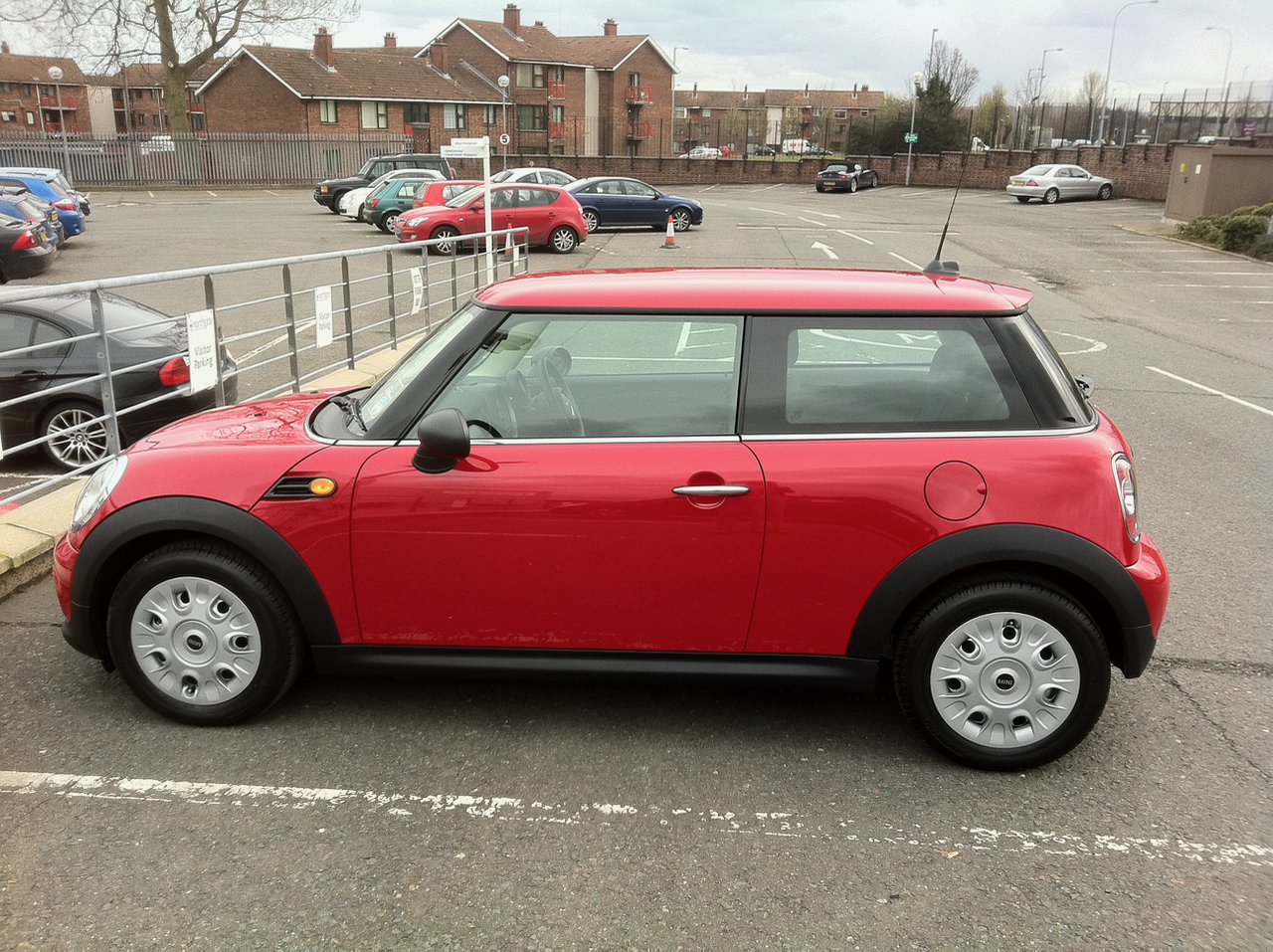
Got my new car on St Patrick’s day. To replace the Honda Civic Hybrid I had since January 2008. Given I don’t do many miles, the Honda went back after the end of a 3 year lease with only 14,600 miles on it, I decided to get something cheaper. The company I lease from suggested a Mini. And that’s what I ended up getting. A Mini One D in red. I like it. Fun to drive, plus it’s ยฃ100 per month less to lease than I was paying for the last 3 years. Including free servicing for the 3 years. Result! Click on the picture to get larger view.


Discharged

This post is a capstone. I’ve blogged a bit over the last 8 years on my treatment for Testicular Cancer. I was discharged last week after my annual checkup. So assuming nothing else happens this will be my last post on the subject ๐Ÿ™‚

Life goals (amended) …

Here are my life goals for the foreseeable future:

  • Get a novel length work of fiction onto the Kindle and iBooks stores for people to buy or, if they feel it warrants it, ignore!
  • Do a Science MSc degree part time with the OU.
  • Get an album of my own music onto iTunes Music Store for people to buy or ignore!

That’ll keep me busy during the Times of Austerity we are entering ๐Ÿ™‚


Those flanneled fools…

I’ve decided to start playing cricket again this summer. I stopped in 2003 when I had surgery for TC. I did play one game towards the end of 2004 but got side tracked after that. Time to go back. Hoping to get fit enough to work up a reasonable head of steam when bowling from the city end at Stormont

Looking forward to it ๐Ÿ™‚


Twitter is my journal/diary

I’ve tried keeping a diary a few times. Even bought MacJournal for Mac and a Maxjournal for iPad to do it in. I used MacJournal for a few months last year, but I never stuck at it.
I’ve realised that I don’t need to. Twitter is my diary. I usually tweet where I am and what I’m doing. Combined with a backup of the tweets via the BackupMyTweets website I have a record of what I was doing on most days, if I should ever need it, or want to read it, in the future. Combine that with longer pieces here on the Soapbox and I have what I was using MacJournal for anyway.


Album of the year contenders for 2010

Been a while since I updated this post. Luckily there has been a spate of new albums in the last while to make up for a dearth earlier in the year.

I kept a list of album of the year contenders last year and picked my favourite in December. I will be doing the same this year. As I buy new albums this year I’ll update this list and pick my favourite after Christmas. Last year was a bumper year for brilliant new music in my opinion. Arguably the best year for new albums that I liked since 1975, which is when I started buying albums with my own (pocket) money. The albums listed here will not be in any order of preference during the year.

First addition to the list is The Family Jewels from Marina & the Diamonds [Listen on Spotify. Buy on Amazon or iTunes. Follow Marina on Twitter]. I first discovered Marina via a tweet on Twitter early in 2009. The songs available then were brilliant. Tracks like I Am Not A Robot, Obsessions and Mowgli’s Road for example. I got to see Marina live at the iTunes Live Festival in July at the Roundhouse in Camden [Buy on iTunes]. She was excellent live. A brilliant voice delivering her very good songs. The new album that has just come out doesn’t disappoint. The new tracks added to the existing tracks are very good. I like Shampain and Girls especially.

Lost Where I Belong from Andreya Triana [Listen on Spotify. Buy on Amazon or iTunes. Follow Andreya on Twitter]. I first heard a track from this album when it was the free single of the week on UK iTunes Store in August. Got the album on the back of that. It’s brilliant. I like all the tracks. Andreya has a wonderful voice.


Deleted Xcode from my Mac

I deleted Xcode from my Mac. The two version I had installed were using 20GB of space on the hard disk. I haven’t used them for months. I just don’t have the skill or inclination to write software that I would be able to put on the Mac or iOS stores. I’ve enjoyed tinkering in the past just so I know what people are talking about in relation to Apple platform development. Other things interest me more now though. I’ll still keep REAL Studio on my Mac for the times I want to bang out a simple program for my own use. I’ll still keep up to date with GUI issues on the mac and iOS devices. So I’ll still be reading books about this. Like the excellent Tapworthy.

I guess this means I won’t be going to WWDC this year. I could justify it in the past but not now I think. Given the lack of Mac OS X Server content last time and the fact the Xserve is no more. Which may, or may not mean the death of Mac OS X Server as a viable server platform (let us run it in VMware vSphere!). It’s unlikely that the 2011 WWDC will have much enterprise ICT content to justify attendance for non-developers.

This means I may not spend at least a week in San Francisco in 2011. Yikes. Of course I have enough Marriott Hotel points and BA miles to go for a weeks holiday. Could even go WWDC week and sit in the sun to read & write during the day and have a few beers and concerts at night…


Pimping God to sell your book

You may have noticed that Stephen Hawking has a new book out. He has been poking the beehive by declaring that science does not need to make reference to God to explain the Universe.

I have no problem with this. It’s a simple fact. The more we discover about the Universe the less there is room for the Abrahamic God as depicted in the 3 major religions that came out of the Near East. In fact it’s been decades since the claims to said deity have been falsified.

What I do have a small problem with is the way that scientists revert to the God device when addressing certain cosmological concepts. Examples like ‘The God Particle’ for the Higgs Boson, and Hawking’s last line in his eponymous book ‘A Brief History Of Time’. It’s annoying. More importantly it’s a poor use of language. It gives the impression that scientists such as Hawking and Higgs buy into the deity fallacy. Which they patently don’t.

I wish that science communicators would refrain from using this term when explaining current theories and hypotheses. Even if they do want publicity in he week their book hits the shelves and eStores!

Like the new Amazon Kindle

Had a play with Ian Moran’s new Amazon Kindle this morning. Very nice indeed. It has the same screen as my Sony PRS-505 eInk reader. The new Kindle is much better to look at than the previous model. If I was buying an eInk device in the UK I’d get the new Kindle. The Sony PRS-300 has a better form factor I think, but the Kindle Store and the easy access to content trumps it in the UK. In North America the Sony Store might make me choose the Sony over the Kindle.


Amazon Associates link above.


Not doing a Math degree

Have decided not to do a mathematics degree via the OU as I mulled about in a previous post. I’m going to do self study for a few years using the books in the picture. Click on the picture for a larger view. I already have these books. So in addition it’s free entertainment and fits into my larger plan to pay off everything I owe and get to a debt free state as soon as possible (including paying of my mortgage).


Thinking of doing an OU physics & maths degree

Debating the idea of taking 6 years to do a part time physics and maths degree via The Open University. Just to give me a framework to teach myself maths. I really have a bee in my bonnet about learning maths. It’s like my own Mount Everest. The modules leading to the degree would be:

MU123 – Discovering mathematics
MST121 – Using mathematics
MS221 – Exploring mathematics
MST209 – Mathematical models and methods

S207 – The physical world
S282 – Astronomy

S382 – Astrophysics
S383 – The relativistic universe
SM358 – The quantum world
SXP390 – Science project course: radiation and matter

Then again I might just do it self study via books I’ve got and not get the degree. I’ve got one already ๐Ÿ™‚ Could do a Masters in something else to get more paper!


Always been an atheist

In response to the blog post by Dad Who Writes, about his journey from Catholicism to atheism I thought I would post here what I said in the comments to his blog post.

I don’t have a similar journey to share. I’ve always been an atheist. My parents were not religious. They did force me to go to Sunday School for a few months (so I would see what it was about) but I didn’t buy into any of the God stuff. This was a Church of Ireland protestant Sunday School. I have a brother 12 years older than me so when I was growing up I was reading his science and engineering books. I think I started to tell people I didn’t believe in God from around the age of 8 or so.


iPad as a blogging tool

Testing the WordPress app on my iPad. When I get my new Vodafone MiFi I’ll be using the iPad when out and about a lot more than my MacBook Pro. I also want to do a lot more blogging on a diverse range of subjects. Mainly from airports I expect ๐Ÿ™‚

Well if you can see this post then the WordPress app works!

Scroll to Top