Seven is the new black

So Google have announced the Nexus 7 Android tablet. Available to pre-order now from the Google play store and shipping in a few weeks. It’s priced very aggressively at ยฃ159 in UK ($199 US) and will be running Android 4.1 Jelly Bean. It actually looks pretty good. No carrier stuff stuck on top of the base Android. Consensus seems to be that the main competitor to this is the Amazon Kindle Fire.

I think that this new Nexus 7 will also have an impact on the iPad tablet market. The cheapest iPad in the UK is ยฃ329. That’s for the iPad 2 that is still for sale. The 3rd Generation iPad, with its simply stunning screen, starts at ยฃ399. That means that the Nexus is well under half the price of the cheapest iPad. It’s true that the iPad, with its higher resolution screen, can be used for different types of tablet apps than are possible on a 7 inch screen. But I think that the low entry price of the Nexus will cause people to stop and think about what to buy. Especially in schools. Getting two Nexus tablets for each iPad will help schools deliver on a 1:1 device programme.

So what should Apple do? I think that they should do a 7 inch tablet device. But I don’t think it should be an iPad 7. They should use the iPod brand to fill this space. It’s clear that over the last few years that the iPhone has cannibalised some of the iPod sales. The iPod touch with the 3.5 retina display still sells well. It’s like an iPhone without the mobile radio, which is useful in a lot of situations.ย I think that Apple should target the 7-inch touch device market with an iPod touch 7. It would give people the option of using the iOS platform, at a lower price point than the ยฃ329 and higher cost for iPad. Thisย would leave the iPad name for the premium tablet space (which Apple owns). An iPod touch 7 could run current iPhone and iPod touch apps doubled up. On a 7 inch retina screen this would be okay. Developers would need design new apps targeted at the 7 inch screen as well.

I wonder if we’ll see an iPod touch 7 at this years September iPod event.

Reading list

Books I want to read this year. List is in no particular order. I’ll select from the list based on whim. Let’s all gather round the glow of our screens in December to see how many I managed to read.ย 

Lonely Planets (David Grinspoon) –ย Finished

Insanely Simple: The Obsession That Drives Apple’s Successย (Ken Segall) – Finished

Chocky (John Wyndham) – Finished

The Geek Manifesto (Mark Henderson) – Finished

By Light Alone (Adam Roberts) – currently reading

Solaris Rising (Various) – partiallyย read. Short stories.

Manhattan in Reverse (Peter F. Hamilton)ย –ย partially read.ย Short stories.

The Fabric of the Cosmos (Brian Green) โ€“ partially read

The Devine Wind (Kerry Emanuel) – partially read

Paradox (Jim Al-Khalili)

Why Beauty is Truth (Ian Stewart)

The Rough Guide to the Future (Jon Turney) – Finished

The Equations: Icons Of Knowledge (Sander Bias)

Very Special Relativity (Sander Bias)

It Must Be Beautiful: Great Equations of Modern Science (Graham Farmelo)

The Quantum Universe (Brian Cox & Jeff Forshaw)

Why Does E=mcยฒย (Brian Cox & Jeff Forshaw) – Finished.

Calculus Made Easy (Silvanus P. Thompson)

China: Illustrated History (Patricia Buckley Ebrey)

America: A Narrative History (George Brown Tindall, David Emory Shi)

The Seven Basic Plots (Christopher Booker)

Writing Fiction: A Guide For The Narrative Craft (Janet Burroway, Elizabeth Stuckey-French)

Reading Like A Writer (Francine Prose)

How Not To Write A Novel (Howard Mittlemark, Sandra Newman)

The Etymologicon ย (Mark Forsyth)

Snuff (Terry Pratchett) – Finished

Dodger (Terry Pratchett)

The Long Earth (Terry Pratchett and Stephen Baxter)

Starmaker (Olaf Stapledon)

Odd John (Olaf Stapledon)

Last And First Men (Olaf Stapledon)

Jack Glass (Adam Roberts)

Novelists Boot Camp (Todd A. Stone)

God: The Failed Hypothesis (Victor J. Stenger)

The Comprehensible Cosmosย (Victor J. Stenger)

Irreligion (John Allen Paulos)

The Universe (john Gribbin)

Why Business People Speak Like Idiots (Brian Fugere, Chelsea Hardaway, Jon Warshawsky)

Consider Her Ways (John Wyndham)

Land Of The Headless (Adam Roberts)

Gradisil (Adam Roberts)

50 Mathematical Ideas You Really Need To Know (Tony Crilly)

50 Philosophy Ideas You Really Need To Know (Ben Duprรฉ)

50 Physics Ideas You Really Need To Know (Joanne Baker)

Logic: A Very Short Introduction (Graham Priest)

Mathematics: A Very Short Introduction (Timothy Gowers)

Guerrilla Home Recording (Karl Coryat)
ย 


ย 

ย 

ย 

ย 

ย 

National App Development Month – NaAppDevMo

I’m deep into NaNoWriMo for the 2nd year at present. It’s designed to get you to forget about reasons why you can’t write a novel length piece of fiction (well 50,000 words anyway, a short novel!) and just get you writing with abandon for the month of November. It’s great fun, and it works. Seeing that relentless slope add 1667 words to where you should be every day is a great motivator. No one expects the 50,000, or more, words that you will have in Scrivener on the 1st December will be something that can be published. No, what you will have will be a chunk of a story that you can add to, edit like blazes, and maybe at some point in the future, have something good. NaNoWriMo is a kick-starter.

I was thinking recently that it would be useful to have a month to focus on doing an app from start to finish. I’ve dabbled with development for ages, without knuckling down and getting something done. I’ve decided to do it in December. Take 31 days and use my spare time to do an iPhone app that I want for myself.ย I floated the idea on Twitter and a few people seemed interested in doing something themselves. Of course I’m doing an iPhone app, but there is no reason that any other sort of app couldn’t be done. A Macintosh app, a Windows Phone 7 app, an Android app, a web app, or an app for whatever platform you like.

I know what my App will be. I want it for when I’m travelling. None of the iPhone travel apps do this one task the way I want it to work. Or if they do, they link to web services where you need to have an account etc. And all the other features of the web service and app, that I just don’t want, get in the way. Keep it simple!ย So the goal of NaAppDevMo for me is to provide a rigid timeframe and a structure within which I can get this basic app done.

Like in NaNoWriMo you are not going to produce an app that will make you a fortune, or maybe even make it to the App Store. But what it might give you is the confidence that you can take a concept for an App from design, through to running on your device (or in a simulator). This will hopefully show you that it is possible for you to do App development. Even if it’s just as a hobby and for fun. And if your App is useful you can spend time over the next few months maybe refining it and releasing it for others to use.

To do NaNoWriMo successfully most people need to do some planning up front, so that they have scenes and ideas ready to write about at the start of November. The same would be true for NaAppDevMo. Some planning would be useful. Outlining what the App you are going to design and produce should do would be a good start. I’d say keep it simple and do an app that performs one task really well. I’d make it a real task though. One that you would find useful yourself.

There is a Twitter hashtag #NaAppDevMo that you can use to post status updates if you are going to participate, or just follow it to see how others are getting on. There won’t be a website like the one there is for NaNoWriMo. Post blog posts on your own site, updates on Twitter, or on FaceBook about your progress.

Here are some pointers to resources for iOS development that you may find useful if just starting out. These are just a small sample of the resources out on the web for new iOS programmers. Post others you think would be useful on Twitter using theย #NaAppDevMo tag. Post any you think would be useful for other platforms as well if you are targeting them.

Beginner iOS Development Tutorials

There are some great looking new iOS 5 development tutorials on the iOS Apprentice site. These are epic length tutorials that take you from start to a finished app. So a great resource if you are just starting out with iOS development. The 1st tutorial in the series is free. It’d be well worth doing the 3 that are available now before doing your own app in December. The tutorials cover the new iOS 5 additions that you will want to use. Like ARC, so you don’t have to do manual memory management, and Storyboards to allow you to design the workflow of your app.

Stanford University have a complete series of lectures on iTunesU for their course CS 193P iPhone Application Development. The current series of lectures is being posted as they are available. They cover iOS 5.

App Design

For iPhone app design the book Tapworthy by Josh Clark is a very good resource. Apple have some great user interface design sessions available on iTunesU. You have to be a member of the Apple Developer Program to access these. I’m not sure if they are available to people with the free membership. If you are doing iOS dev then the paid option is useful if you want to run your apps on physical devices to test. It’s $99 (ยฃ69 in UK). You can run your apps in the Xcode simulator if you are not a paid member of the iOS developer program.

Some essential videos to watch:

WWDC 2009 Session 100 – iPhone Interface Design – Basic iPhone design. Might be a bit dated now, but good foundation.

WWDC 2010 Session 103 – iPad and iPhone User Interface Design – The 6 stage app design process outlined in this session is great.

WWDC 2011 Session 110 – Designing User Interfaces for iOS and Mac OS X Apps – The latest update on how to design apps. Based on last few years of actual use and experience of Apps out in the world.

Books

There are lots of good beginner level books out there for iOS development. For NaAppDevMo I’d go with the iOS Apprentice tutorials as a start. You might want a book on Objective-C so here are 2 very new ones. One is a new edition that covers ARC etc. and is due on 15th December.

Programming in Objective-C: Updated for iOS 5 and Automatic Reference Counting

Objective-C Programming: The Big Nerd Ranch Guide

ย 

ย 

Proposal to up motorway speed limit to 80mph

The UK Government are holding a consultation to canvas views on whether the speed limit on UK motorways should be increased from 70mph to 80mph. It seems to me that many people currently drive at about 75mph when the motorway is clear. They see 75mph as enough over the speed limit not to get prosecuted. If the limit is raised to 80mph then 85mph will become the new norm. I can’t see the point in this. In my experience all this will mean is that you will get to the next part of your journey with congestion more quickly. It won’t make much difference to overall journey times. I’ve tried driving long distances going faster than the speed limit when I can, and then the same journey sticking to the speed limits. Over a 2 week period the times the journeys took each day were with 10 minutes of each other. Some of the fastest journeys were the days I stuck to the speed limits. So I can’t see this increase to 80mph making journeys quicker. It’ll also burn more fuel for no gain.

If they want to decrease journey times it’d be better to make it an offence to sit in the overtaking lanes on the motorway when there is space on the inner lanes. 3 points for everyone hogging the overtaking lane would do more to increase traffic flow on the motorway than increasing the speed limit!

Thanks Steve

Lots has been written today about the death of Steve Jobs. Too soon at the young age of 56. Stephen Wolfram’s thoughts are worth a read, as are Stephen Fry’s. I won’t add a long post to what’s been already written. I’ll just add my thanks to Steve, and all those who worked with him, for providing products that have made my life richer and easier since the 1980’s. Steve’s legacy will live on via the great team that he has left in charge at Apple. I’ve been lucky enough to have seen several of these Apple employees, and many, many others, at various Apple and Macworld conferences. They are all brilliant. Steve has left Apple in good hands. The road ahead has been signposted by Steve Jobs’ vision. I look forward to walking it.

ย 

Data Security on my Macintosh

I have a MacBook Air. By definition it’s a portable computer. As such it travels with me. It is therefore at risk of being lost or stolen when I’m out and about in the big wide world. Actually the Air is so light I can’t tell if it’s in my laptop bag! I’ve often had to check to see if I still have it when walking to a gate in an airport.

So what do I do to protect the data on my MacBook Air? I do a lot. I encrypt the data to protect it if I lose the laptop. That’s to stop anyone getting access to my data if they have my computer. I also do backups so that I can put my data back on to a new computer if required.

Encryption

I use 3 levels of encryption on my MacBook Air. I am running OS X Lion. This has a feature built in called FileVault 2. This provides full disk encryption and boot protection. The encryption is XTS-AES 128bit. I use a strong password (long password with both letters and numbers) and when I turn on my MacBook Air it asks for this password. Until it is entered the Mac does not load the operating system. Data on the hard disk is encrypted and can’t be accessed without this password. So if someone steals the Mac (or finds it!) they can’t get the data unless they guess the strong password. If you have a portable Macintosh and are running OS X Lion you should turn on FileVault 2.

I also use a disk image with AES-256bit encryption to store work related files. This uses a separate strong password from the one I use for FileVault 2. I also don’t store the password for this disk image in the Macintosh Keychain. This stops the disk image being used until the password is entered. So if someone does get past the boot password, then my important work stuff is protected. Apple have a support article on creating a disk image. Make sure to create a sparse disk image that only uses the space it needs. So a 40GB sparse disk image will grow in size from zero up to 40GB as you store files in it.

I have to use a Microsoft Windows 7 virtual machine for work related stuff. I use Parallels Desktop for Mac 7 to host this on my MacBook Air. This has a feature to encrypt the virtual machine file. I have this turned on and use a different strong password to protect it. This password is required to boot the Windows operating system in the virtual machine. Another popular virtualisation solution for running Windows on a Macintosh is VMware Fusion. Version 4 of this has the ability to encrypt virtual machines. If you are running VMware Fusion and want the extra level of protection for your Windows files then upgrade to version 4.

Backups

Backups are essential. You have to back up your data. Fortunately this is easy on a Macintosh. The last few versions of Mac OS X (renamed to just OS X Lion with the current version) include a feature called Time Machine. This is the simplest way to backup your Mac. Buy an external USB drive. If you don’t know how to format a drive for Mac then buy one that is already formatted for Macintosh. Or ask me how to format the disk on Twitter or via email using the link in the sidebar. When you have the disk, plug it in and answer Yes when asked if you want to use it for TIme Machine! That’s it. Plug the disk in when at your desk and backups will be done on the hour.

I also use a 50GB DropBox to keep a copy of my personal files up in the cloud. This means they are available from anywhere and are safely offsite in case something happens to my Time Machine backup. If you have any really important files you could put them in an encrypted sparse disk image that you store in your DropBox. You can get a free DropBox account that gives you 2GB of offsite cloud storage.

Protecting Passwords

Another way to protect your data is to use strong passwords, and different passwords for each service that you use. I’d strongly recommend checking out 1Password to store your strong passwords. Even better let 1Password generate random strong passwords for the services you use.

ย 

Novelist’s Boot Camp

I bought a copy of Todd A. Stone’s book about writing titled Novelist’s Boot Camp. Todd was an instructor at West Point, a soldier and is a successful writer. His Boot Camp book treats writing a long novel in the same manner as starting and completing army boot camp ๐Ÿ™‚

The process of writing a novel is divided into 8 sections:

  • mental preparation
  • planning
  • invention
  • development
  • drafting
  • revising
  • editing
  • proofreading

I’m going to use October to do the sections from the book covering the first 4 in the list planning for my National Novel Writing Month book. (#nanowrimo on Twitter). I’ll then spend November doing the first draft of 50,000 words or more. Bring it on!

My favourite iPad apps

Lots of people are buying iPads. Many of them ask me what my favourite iPad apps are. This Soapbox post is my response. I’ll point people to here when they ask me about good apps. It’s also worthwhile following the #goodiPadApps hashtag on Twitter.

I’ll add more explanation as to why I like these apps over time. But I’ll start with a list and links to the App Store.

Productivity Apps

Apple Pages – Word processing and page layout application. Reads and writes Pages for Macintosh files and also Microsoft Word files.

Apple Keynote – Word processing and page layout application. Reads and writes Pages for Macintosh files and also Microsoft PowerPoint files.

Apple Numbers – Word processing and page layout application. Reads and writes Pages for Macintosh files and also Microsoft Excel files.

MindJet – Mind mapping application. Just out. Seems very good.

OmniGraffle – Diagramming app. For doing network and organisational chart type diagrams.

Apple iMovie – For editing video.

OmniOutliner – For taking notes in an outliner form.

OmniFocus – The best Getting Things Doneยฎ app. Syncs with Macintosh and iPhone versions. I like OmniFocus a lot!

OmniGraphSketcher – If you need an app to visualise data and produce graphs, including logarithmic ones, then this is great.

Reading Apps

Apple iBooks – eBook reader. Used for books from the Apple iBooks store. Also reads standard ePub and PDF files. I use this for most of my book and PDF reading. I do most of my reading on iPad now. Only buy paper when I can’t get a book as an eBook.

Amazon Kindle – eBook reading app for iPad that allows you to read Kindle books on iPad. I use this when I can’t get an ebook I want from iBook Store. Kindle store has a much better selection of books than iBook Store. Kindle app isn’t as nice as iBooks, but it’s fine.

Reeder – This is a great RSS news feed reading app. Sync with Google Reader. There are also Macintosh and iPhone versions that stay in sync across devices. Any app that uses Google Reader will stay in sync with Reeder.


Science Apps

Redshift – Astronomy – Another great astronomy app. I use this as well as Pocket Universe. I like the way Redshift allows you to virtually fly from Earth to distant stars ๐Ÿ™‚

Solar System for iPad – An interactive eBook app that gives lots of information about the Solar System.

Exoplanet – Great app that alerts you when new extra-solar planets are discovered. Also has visual charts showing how far the new planets orbit from their stars. Plus other great data visualisations.

The Elements – An interactive Periodic Table of the Elements. From Theodore Gray of Wolfram Research. They also did Solar System for iPad above. The Elements is visually stunning. I love it ๐Ÿ™‚


Utilities

iPassword – Great secure locker for passwords. Get the Pro version if you have an iPhone as well. It runs on both devices. I had the separate iPhone version already.

Soulver – Natural language calculator. Understands commands like “$70 in ยฃ” and “38% of 237”. A brilliant app.

PCalc – The best traditional calculator app. Use the Twilight theme. Its ace.


More to follow…


Switching Soapbox to a new theme

I’m in the middle of switching my Soapbox site to a new theme. Canvas from WooThemes. I’m planning of doing a lot more writing on 4 main topics on this site in the future. These will be science, technology, teaching myself mathematics (to better understand science) and also some fiction, and posts about writing fiction.

I wanted a cleaner, simpler and whiter layout for the site. Canvas theme fits the bill very nicely ๐Ÿ™‚ So over the next few days the layout of the site will change as I mess about with the settings in the WooThemes framework and the Canvas theme.

ย 

2011 Science book per month challenge

Inspired by Ian Sales idea, I’ve decided to read a popular science book each month in 2011. The list of the 12 books (which is changing as the year goes on!):

  1. The Greatest Show on Earth: The Evidence for Evolution – Finished
  2. Why Evolution is True
  3. Divine Wind: The History and Science of Hurricanesย – Currently Reading
  4. Four Laws That Drive The Universe – Finished
  5. Lonely Planets: The Natural Philosophy of Alien Life
  6. Why Beauty is Truth
  7. The Rough Guide To The Future
  8. Future Files: A Brief History Of The Next 50 Years
  9. An Optimist’s Tour of the Future – Finished
  10. The Magic of Reality: How We Know What’s Really True
  11. How It Ends: From You to the Universe
  12. The Fabric of the Cosmos – Partially Read

I’ve added a 13th book. Coincidently this book comprises 12 essays so I could read 1 per month alongside the other 12 books. The 13th (or zeroth as I’ll call it) is:


New car

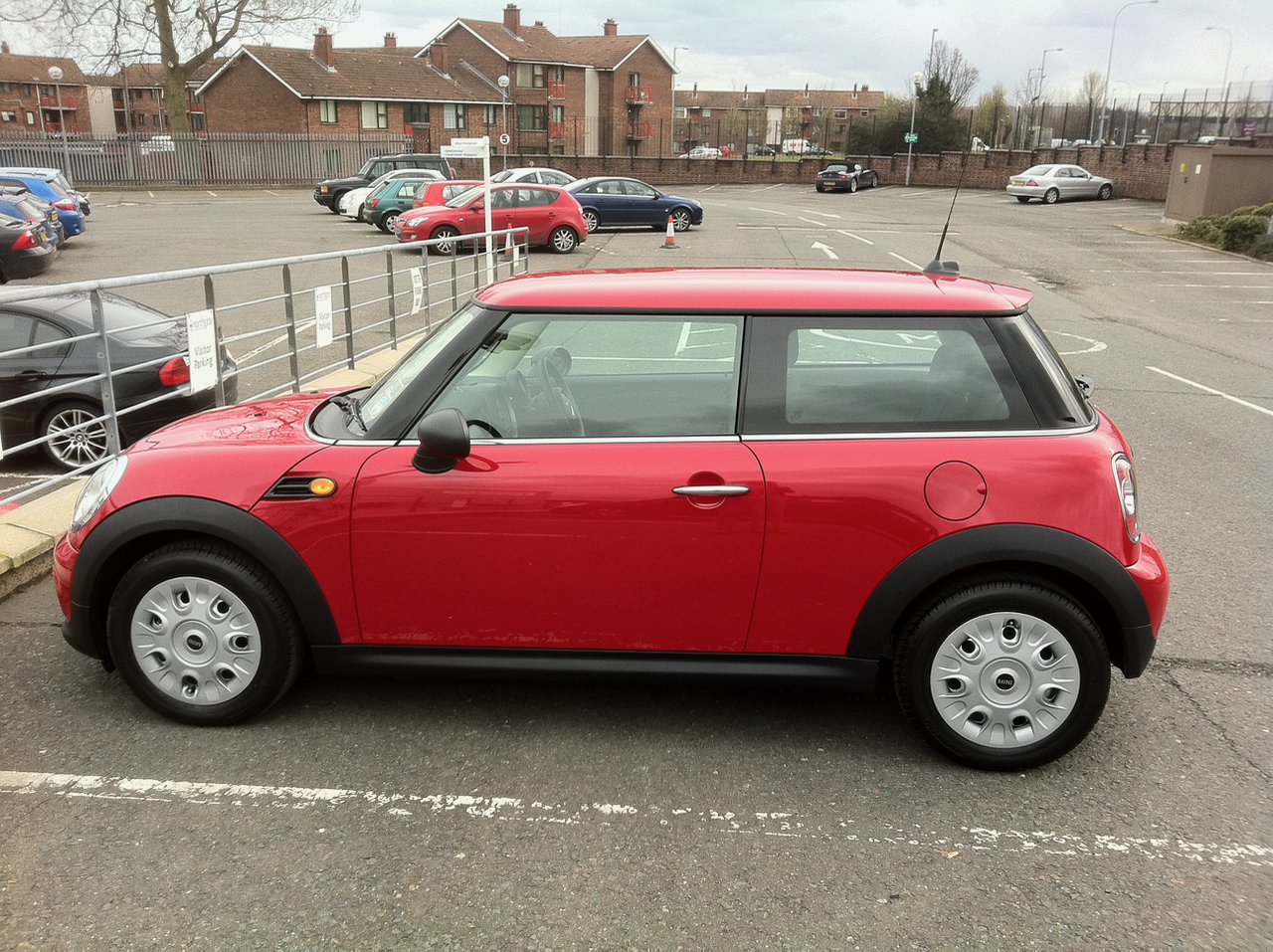
Got my new car on St Patrick’s day. To replace the Honda Civic Hybrid I had since January 2008. Given I don’t do many miles, the Honda went back after the end of a 3 year lease with only 14,600 miles on it, I decided to get something cheaper. The company I lease from suggested a Mini. And that’s what I ended up getting. A Mini One D in red. I like it. Fun to drive, plus it’s ยฃ100 per month less to lease than I was paying for the last 3 years. Including free servicing for the 3 years. Result! Click on the picture to get larger view.


Discharged

This post is a capstone. I’ve blogged a bit over the last 8 years on my treatment for Testicular Cancer. I was discharged last week after my annual checkup. So assuming nothing else happens this will be my last post on the subject ๐Ÿ™‚

Life goals (amended) …

Here are my life goals for the foreseeable future:

  • Get a novel length work of fiction onto the Kindle and iBooks stores for people to buy or, if they feel it warrants it, ignore!
  • Do a Science MSc degree part time with the OU.
  • Get an album of my own music onto iTunes Music Store for people to buy or ignore!

That’ll keep me busy during the Times of Austerity we are entering ๐Ÿ™‚


Those flanneled fools…

I’ve decided to start playing cricket again this summer. I stopped in 2003 when I had surgery for TC. I did play one game towards the end of 2004 but got side tracked after that. Time to go back. Hoping to get fit enough to work up a reasonable head of steam when bowling from the city end at Stormont

Looking forward to it ๐Ÿ™‚


Twitter is my journal/diary

I’ve tried keeping a diary a few times. Even bought MacJournal for Mac and a Maxjournal for iPad to do it in. I used MacJournal for a few months last year, but I never stuck at it.
I’ve realised that I don’t need to. Twitter is my diary. I usually tweet where I am and what I’m doing. Combined with a backup of the tweets via the BackupMyTweets website I have a record of what I was doing on most days, if I should ever need it, or want to read it, in the future. Combine that with longer pieces here on the Soapbox and I have what I was using MacJournal for anyway.


Album of the year contenders for 2010

Been a while since I updated this post. Luckily there has been a spate of new albums in the last while to make up for a dearth earlier in the year.

I kept a list of album of the year contenders last year and picked my favourite in December. I will be doing the same this year. As I buy new albums this year I’ll update this list and pick my favourite after Christmas. Last year was a bumper year for brilliant new music in my opinion. Arguably the best year for new albums that I liked since 1975, which is when I started buying albums with my own (pocket) money. The albums listed here will not be in any order of preference during the year.

First addition to the list is The Family Jewels from Marina & the Diamonds [Listen on Spotify. Buy on Amazon or iTunes. Follow Marina on Twitter]. I first discovered Marina via a tweet on Twitter early in 2009. The songs available then were brilliant. Tracks like I Am Not A Robot, Obsessions and Mowgli’s Road for example. I got to see Marina live at the iTunes Live Festival in July at the Roundhouse in Camden [Buy on iTunes]. She was excellent live. A brilliant voice delivering her very good songs. The new album that has just come out doesn’t disappoint. The new tracks added to the existing tracks are very good. I like Shampain and Girls especially.

Lost Where I Belong from Andreya Triana [Listen on Spotify. Buy on Amazon or iTunes. Follow Andreya on Twitter]. I first heard a track from this album when it was the free single of the week on UK iTunes Store in August. Got the album on the back of that. It’s brilliant. I like all the tracks. Andreya has a wonderful voice.


Deleted Xcode from my Mac

I deleted Xcode from my Mac. The two version I had installed were using 20GB of space on the hard disk. I haven’t used them for months. I just don’t have the skill or inclination to write software that I would be able to put on the Mac or iOS stores. I’ve enjoyed tinkering in the past just so I know what people are talking about in relation to Apple platform development. Other things interest me more now though. I’ll still keep REAL Studio on my Mac for the times I want to bang out a simple program for my own use. I’ll still keep up to date with GUI issues on the mac and iOS devices. So I’ll still be reading books about this. Like the excellent Tapworthy.

I guess this means I won’t be going to WWDC this year. I could justify it in the past but not now I think. Given the lack of Mac OS X Server content last time and the fact the Xserve is no more. Which may, or may not mean the death of Mac OS X Server as a viable server platform (let us run it in VMware vSphere!). It’s unlikely that the 2011 WWDC will have much enterprise ICT content to justify attendance for non-developers.

This means I may not spend at least a week in San Francisco in 2011. Yikes. Of course I have enough Marriott Hotel points and BA miles to go for a weeks holiday. Could even go WWDC week and sit in the sun to read & write during the day and have a few beers and concerts at night…


Scroll to Top